
The Contact Signals That Matter in Email But Not on LinkedIn
Some contact signals are critical for email but meaningless on LinkedIn. Learn which data points matter by channel and why reusing signals causes outbound failure.
INDUSTRY INSIGHTSLEAD QUALITY & DATA ACCURACYOUTBOUND STRATEGYB2B DATA STRATEGY
CapLeads Team
12/17/20253 min read
Outbound teams often assume that a “good contact” is universally good. If a person exists on LinkedIn and looks active, the thinking goes, they must also be safe to email.
That assumption breaks campaigns quietly.
Email and LinkedIn surface very different contact signals, and confusing one for the other is one of the most common reasons outbound feels inconsistent. A contact that looks perfectly usable on LinkedIn can be actively harmful when used in email — not because the lead is bad, but because the channel evaluates risk differently.
Understanding which signals matter where is the difference between predictable outreach and slow domain damage.
1. Email Is Built on Technical Truth, Not Identity
Email doesn’t care who someone claims to be. It cares whether an inbox actually exists and behaves normally.
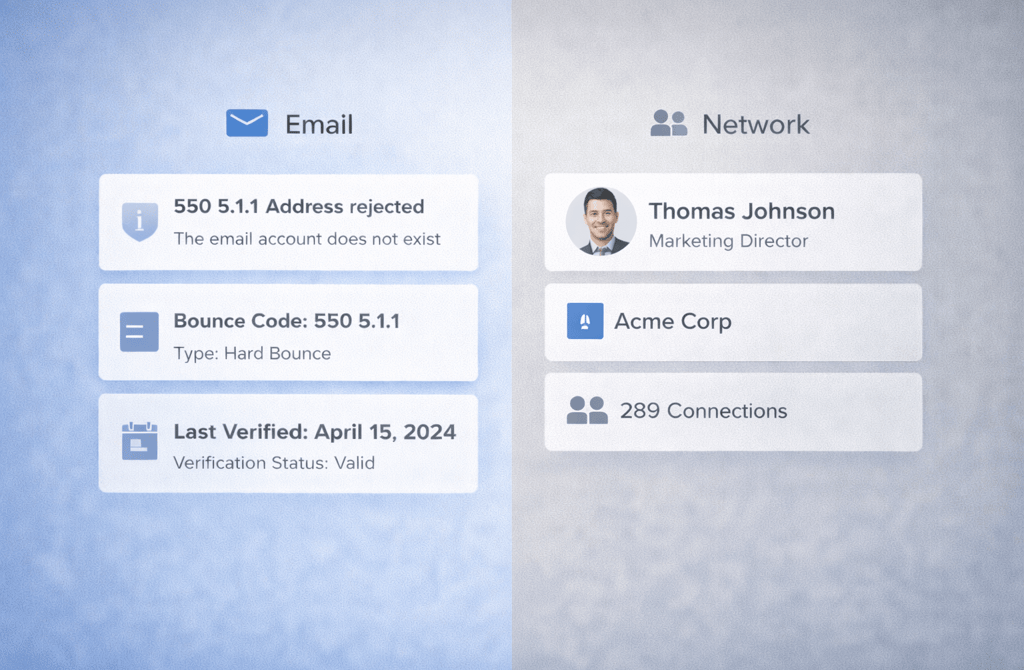
Email-critical contact signals include:
Inbox validity
Domain health
Catch-all behavior
Bounce history
Last verified date
These signals are invisible on LinkedIn. You can’t see whether an email address is abandoned, recycled, or silently failing by looking at a profile.
That’s why email outreach lives or dies on technical accuracy, not surface-level identity.
2. LinkedIn Optimizes for Identity, Not Deliverability
LinkedIn is designed around professional presence, not message delivery.
Signals that matter on LinkedIn include:
Job title alignment
Company association
Network proximity
Profile activity
Role seniority
None of these confirm whether an email address behind the profile is usable.
A contact can:
Be active on LinkedIn
Have a correct title
Appear perfectly reachable
…and still have an email address that hard bounces, soft bounces, or routes to a dead inbox.
LinkedIn validates who someone is.
Email validates whether you’re allowed to reach them.
3. Why Email Signals Don’t Translate Across Channels
Many outbound teams make the mistake of importing email-validated lists directly into LinkedIn outreach — or worse, exporting LinkedIn-sourced contacts straight into email sequences.
This creates false confidence.
Email-specific signals that do not exist on LinkedIn include:
SMTP responses
Server-level rejection behavior
Domain reputation history
Prior send outcomes
LinkedIn will happily let you message a profile that email providers would immediately penalize you for contacting.
That doesn’t make LinkedIn “better.”
It just means the platform doesn’t expose technical failure.
4. The Hidden Risk of Reusing LinkedIn Contacts for Email
This is where most domain damage starts.
A common pattern looks like this:
A team sources contacts from LinkedIn
Messages look fine inside LinkedIn
Engagement feels acceptable
The same contacts are added to email sequences without revalidation
The result:
Unexpected bounce spikes
Sudden deliverability issues
Spam placement with no obvious cause
The root issue isn’t copy, cadence, or volume.
It’s that LinkedIn does not warn you about email-level risk.
5. Why Email Punishes the Wrong Signals Faster
Email providers react immediately to bad signals.
If you send to:
Dead inboxes
Recycled domains
Catch-alls at scale
You don’t get gradual feedback. You get silent reputation damage.
LinkedIn, by contrast, allows:
Messages to be sent without technical checks
Contacts to remain reachable long after email decay
Outreach to continue without hard stops
This difference is why email requires stricter discipline — and why teams that treat LinkedIn contacts as email-ready often misdiagnose what went wrong.
6. How Smart Teams Separate Contact Readiness by Channel
High-performing outbound teams don’t ask, “Is this contact good?”
They ask:
Is this contact technically safe for email right now?
Is this contact contextually accurate for LinkedIn outreach?
They treat email and LinkedIn as different risk environments, with different acceptance criteria.
That means:
LinkedIn contacts are not assumed to be email-ready
Signals are never reused blindly across channels
This separation is what keeps outreach scalable instead of fragile.
Final Thought
Outbound doesn’t fail because teams pick the wrong channel. It fails because they expect the same contact signals to behave the same way everywhere.
When email outreach is fed technically sound, recently validated contact data, it rewards you with stability and reach.
When outdated or channel-blind contact data is reused, inboxes shut down long before prospects ever see the message.
Related Posts
Why Multi-Signal Data Outperforms Basic Email Lists
The Micro-Data Points That Predict Reply Probability
Why Data Completeness Makes Outbound Easier to Scale
How Company Lifecycle Stage Impacts Deliverability
The Common Data Gaps That Break Founder-Led Outreach
The Hidden Indicators That Tell You a Lead Is Worth Emailing
Why Mapping the Buying Committee Boosts Reply Rates
Why AI Needs Clean Inputs to Improve Lead Accuracy
The Hidden AI Errors Caused by Dirty Data
How AI Enhances Lead Processing Without Replacing Humans
Why AI Models Break When Metadata Is Incomplete
Why Each Industry Produces Completely Different Lead Data
The Vertical Data Behaviors Most Outbound Teams Miss
How B2B Data Signals Change Depending on the Industry
Why Industry Structure Shapes Lead Accuracy Patterns
The Vertical Differences That Influence Data Freshness
Why Lead Data Behaves Differently Across Outbound Channels
Connect
Get verified leads that drive real results for your business today.
www.capleads.org
© 2025. All rights reserved.
Serving clients worldwide.
CapLeads provides verified B2B datasets with accurate contacts and direct phone numbers. Our data helps startups and sales teams reach C-level executives in FinTech, SaaS, Consulting, and other industries.